Payment Links Explained: How Businesses Use Them to Get Paid Faster
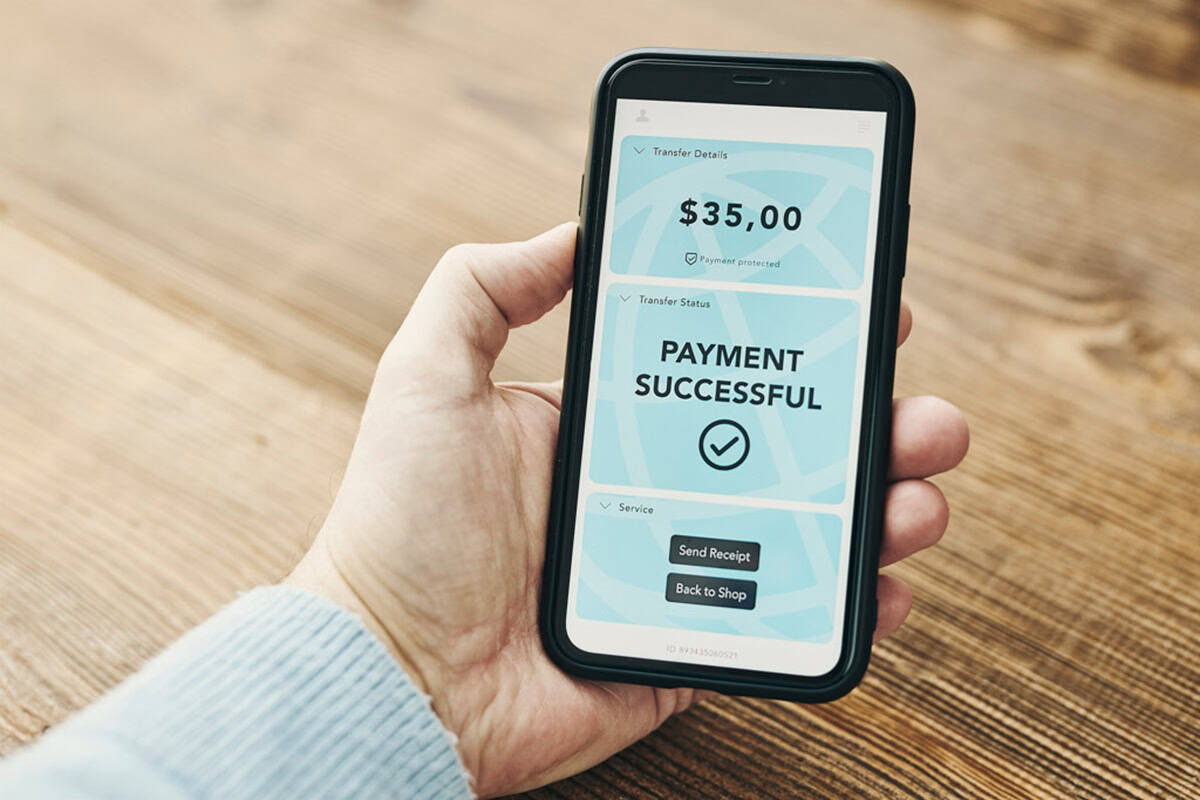
Table of Contents

We help businesses accept payments online.
Payment links are a simple and flexible way for businesses to accept online payments without building a full eCommerce site. By sharing a secure payment URL or QR code through email, social media, messaging apps, or other digital channels, merchants can collect payments quickly while keeping the buying experience smooth for customers.
In Japan, where mobile-first shopping and SNS-driven purchasing are common, many small businesses, freelancers, and service providers sell through conversations rather than traditional online stores. Payment links fit naturally into this style of selling, allowing businesses to move from discussion to payment at the right moment.
In addition, many service providers and B2B sellers rely on invoice-based billing rather than SNS-driven sales. In these cases, Payment Links can be sent together with a digital invoice, giving customers a simple way to review the invoice and complete payment through a single link. This keeps familiar invoicing workflows intact through a mobile-friendly experience.
This article explains what payment links are, how they work, and why they align well with Japan’s mobile- and chat-driven commerce environment, helping businesses evaluate whether payment links are the right solution for how they sell today.
What Is a Payment Link
A payment link is a customizable URL or QR code that businesses can send to customers to securely complete payments online. Even without a website or an eCommerce platform, merchants can offer and share payment links through email, social media, messaging apps, or other digital channels.
Businesses that want to sell products or services outside of a traditional online store, such as through blogs, newsletters, or social media posts, find them especially useful. Customers simply open the link, review the amount, enter their details, and complete the transaction on a secure checkout page.
Payment links can be created for specific customers, products, or services. As long as the price is fixed, the same link can also be reused, making it an efficient and flexible option for small businesses.
Payment links are different from full eCommerce websites. On an eCommerce site, customers browse and discover products. Payment links are designed for when the customer is already ready to pay. They are especially useful for services, custom orders, bookings, or one-time sales where the price is agreed on in advance.
Customers don’t need an account or special app to complete payments; they simply open the link and pay. This creates a frictionless payment experience that works across devices and fits naturally into everyday customer interactions.
How a Payment Link Works
Using payment links is a straightforward process that allows businesses to request and receive payments in just a few steps.
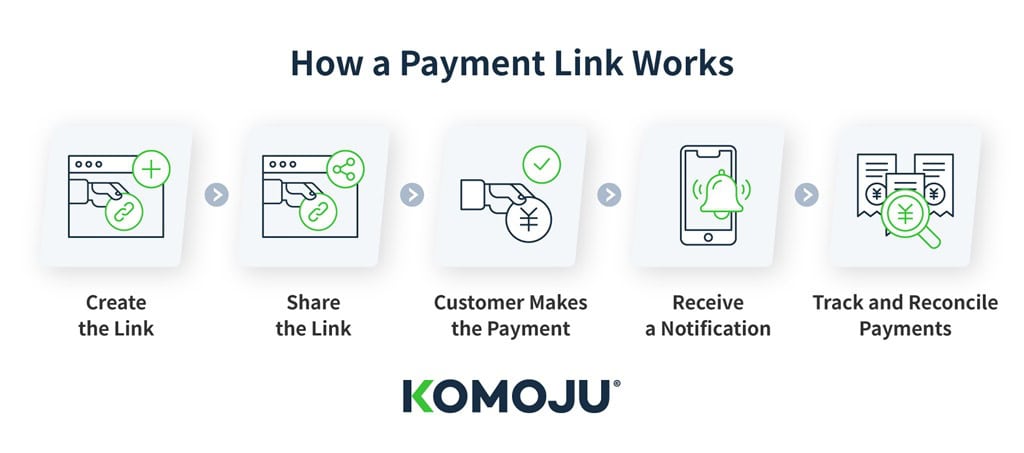
1.) Create the Link
Merchants can quickly and simply create a unique payment link from their dashboard and customize it with the necessary details, such as the amount or the name of the product or service.
2.) Share the Link
The payment link can be shared through email, social media, messaging apps, or posted on websites. Merchants can also send the link directly in customer support chats or booking confirmations. This makes it easy for customers to complete payments directly from the channels they already use.
3.) Customer Makes the Payment
When customers open the URL, they are taken to a secure checkout page hosted by the payment provider. There they can review the amount and enter their payment details. They do not need an account or special app to complete the transaction.
Using a checkout page hosted by the payment provider also helps build customer trust, as payments are completed in a familiar and secure environment. This is especially important in Japan, where customers value clear and reliable payment processes. If the checkout experience feels unfamiliar or too complex, they may hesitate to continue.
The checkout page is hosted by the payment provider, allowing merchants to accept online payments without building or managing their own website or checkout system.
4.) Receive a Notification
Once the payment is processed, both the customer and the merchant receive a confirmation notification.
5.) Track and Reconcile Payments
Businesses can track payment status and review transaction details through their dashboard, helping them stay organized and monitor incoming payments more effectively.
Why Payment Links Are Good for Japanese Businesses
Japan’s shift toward cashless payments has accelerated in recent years, supported by government initiatives. As a result, customers increasingly expect simple, mobile-friendly payment options. Businesses are now adapting how they engage with customers and collect payments online.
Most online browsing and shopping in Japan now happens on smartphones. This makes fast, mobile-first checkout experiences essential. At the same time, social commerce continues to expand. Many small businesses and creators choose to sell through platforms like Instagram, LINE, TikTok, and other social channels rather than operating a full online store.
Messaging apps, especially LINE, are central to how customers interact with businesses today. Customers often want to verify important information such as price, availability, or delivery timelines before committing to a purchase. This makes it an effective channel for both engagement and transactions.
Payment links support this by allowing merchants to complete the conversation first and then send a payment request at the right moment—without pushing customers to a full online store too early.
For example, a merchant can confirm details through chat, send a payment link, and receive payment immediately, all within the same communication channel. This conversational style of commerce makes it important for payment tools to integrate seamlessly into chat-based interactions.
By keeping the entire flow within the same communication channel, businesses can move smoothly from inquiry to confirmation to payment without disrupting the customer experience.
Payment links support this by allowing merchants to send secure and convenient payment requests through the platforms customers already use. This fits well with Japan’s mobile-first and social-first shopping habits, providing businesses with an easy way to accept payments without building a full eCommerce site.
Why Payment Links Win in Conversation-Based Sales in Japan
- Supports Japan’s growing cashless payment habits
- Ideal for selling through social media or messaging apps
- Fits Japan’s chat-based communication style, especially on LINE
- Requires no website or e-commerce setup
- Meets customer expectations for simple, mobile-first payments
The Benefits of Using a Payment Link
Payment links provide businesses with a straightforward way to collect online payments without setting up a website or full eCommerce store. Some of the key benefits include low setup costs, flexible sharing across multiple channels, support for a wide range of payment methods, and a simpler way for merchants to manage payments day to day.
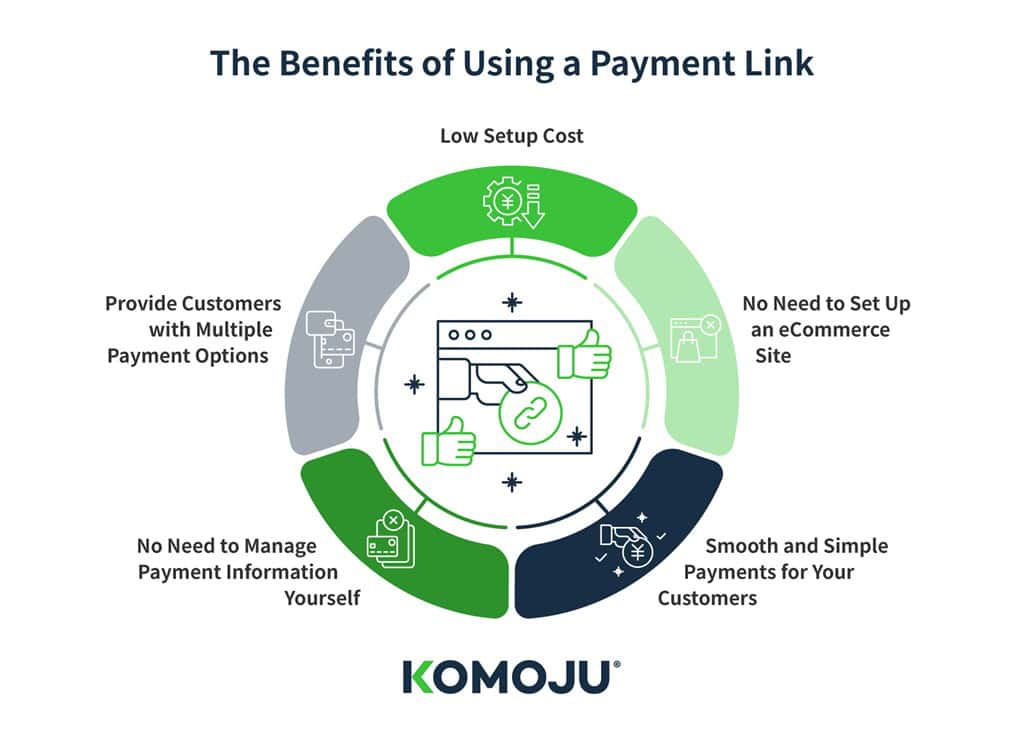
Low Setup Cost
Because they do not require a website, custom development, or special tools, payment links have very low setup costs. This enables merchants to start accepting payments immediately without investing in eCommerce software, plugins, or additional infrastructure.
Payment links are a practical, low-risk option for businesses that want to begin selling online without high upfront costs. They work especially well for testing new products, services, or sales channels without committing to a full online store.
No Need to Set Up an eCommerce Site
Payment links allow businesses to accept online payments without building a full eCommerce site. Even without a website, merchants can begin accepting payments immediately by simply generating a link and sharing it with customers. This makes payment links an easy, low-effort solution for small businesses that want to start selling online with minimal setup.
Smooth and Simple Payments for Your Customers
Payment links remove unnecessary steps and offer customers a smooth, simple checkout experience. The link opens directly to a secure hosted page where they can review the amount, enter their details, and complete the payment within seconds.
The process works seamlessly across email, social media, and messaging apps, making it especially convenient for Japan’s mobile-first shoppers. This streamlined flow reduces friction and encourages customers to complete their purchase.
No Need to Manage Payment Information Yourself
KOMOJU processes all payments through a secure hosted checkout page. Merchants never handle or store customer card information. This keeps payment information safe and lets businesses accept payments without managing sensitive data themselves.
This also reduces the need for businesses to invest in their own security infrastructure or compliance processes. For small teams and growing businesses, this lowers operational complexity and internal risk, allowing them to focus on sales and customer relationships rather than payment administration.
Provide Customers with Multiple Payment Options
Payment links let merchants offer several payment methods through their payment gateway. These include credit cards, digital wallets, and local options such as convenience store payments. By using a gateway like KOMOJU, businesses can support a wide range of payment methods without managing each method individually. Supported methods are listed here.
How to Share a Payment Link - How Different Businesses Use Payment Links
One of the main advantages of payment links is their ease of sharing. Because they are simple URLs, they can be sent through existing communication channels without changing a merchant’s sales flow.
This flexibility allows businesses to collect payments from their customers in the same way that they are already communicating.
Via Social Media
Payment links can be shared directly through SNS platforms such as LINE, Facebook, Instagram, TikTok, or X. Links can be included in profile bios, posts, stories or direct messages, allowing customers to move from discovery to payment within the same platform.
Who shares Payment Links via Social Media:
- Small retailers
- Freelancers
- Content creators
- Home-based businesses
Sellers on social media platforms often include payment links in posts, stories, profile bios, or direct messages.
Via Email
Email is a simple and effective way to share payment links, especially for invoices, bookings, or follow-up payments. Links can be included in order confirmations, reminders, or payment requests to help customers complete transactions quickly.
Who Shares Payment Links via Email:
- Consultants
- B2B service providers
- Agencies
- Educators
- Legal offices
They are ideal for sending invoices, booking confirmations, subscription renewals, or follow-up payments.
In Blog Posts
Payment links can also be placed within blog posts or landing pages to support product sales, event registrations, or service bookings. This allows customers to pay directly from content they are already viewing, without moving to a separate checkout process.
Who Uses Payment Links in Blog Posts or Content Pages:
- Online educators
- Event organizers
- Content-driven businesses
This method supports course sales, event registrations, downloadable content, or service sign-ups. It allows customers to pay directly while engaging with informative or promotional content.
In Customer Support or Booking Messages
Many businesses share payment links through customer support chats or booking confirmations. Sending the link immediately after details have been confirmed helps customers complete payment without delay.
Who Shares Payment Links Through Customer Support or Booking Messages:
- Hospitality businesses
- Salons
- Fitness studios
- Repair services
- Travel providers
Staff can immediately share a payment link via chat or messaging apps, helping customers complete payment quickly and reduce no-shows.
Using Online Forms
Payment links can be sent after a customer submits an online booking or inquiry form. This allows merchants to confirm details first and then share a payment link once pricing or availability is finalized.
Who Sends Payment Links After Online Form Submissions:
- Custom service providers
- Contractors
- Event planners
- Professional service firms
Once pricing, or availability is confirmed, the business sends a payment link to collect deposits or full payments. This ensures accuracy and flexibility in the sales process.
How to Choose the Right Payment Link Provider
Choosing the right payment link provider affects more than just how payments are processed. It can influence conversion rates, customer confidence, and how efficiently payments are managed day to day. A well-designed payment experience supports smoother operations, while a poorly implemented one can create friction and slow down sales.
Not all payment link providers are the same. When choosing a payment gateway, businesses should consider cost, supported payment methods, usability, and security. This is especially important when selling online or across multiple channels.
| What to look for in the right Payment Link Provider |
Setup and Operating Costs | Choose a provider with transparent pricing and low setup costs. Payment links should reduce overhead, not add expenses such as hosting, plugins, or maintenance. It is also important to understand how transaction fees scale with sales volume. |
Supported Payment Methods | A good provider should support multiple payment methods, including credit cards and popular local options in Japan such as convenience store payments and bank transfers. This helps meet customer preferences and prevent lost sales. |
Ease of Use | Payment links should be easy to generate without coding skills. They should be simple to create, share, and manage through a clear dashboard, allowing businesses to focus on sales rather than payment administration. |
Features | Beyond cost and security, providers should offer features that match business needs, such as invoicing capabilities or support for custom pricing. |
Security | The provider should be PCI compliant and use secure hosted checkout pages to protect customer data and reduce risk. Following Japan’s credit card security guidelines is also important. A consistent hosted checkout experience helps maintain customer trust during the payment process. |
Choosing a provider with a clear and consistent hosted checkout experience helps maintain customer trust during the payment process.
Summary | Smooth Transactions with Payment Links
Payment links are a simple and flexible way for businesses to accept online payments. By sharing a secure payment URL through email, social media, messaging apps, or other digital channels, merchants can collect payments quickly and efficiently while keeping the buying experience seamless for customers.
Why they work well in Japan:
- Fit mobile-first shopping habits
- Align with SNS- and chat-driven purchasing behavior
Benefits for customers:
- Simple and convenient buying experience
- Fast and easy payment process
Benefits for small businesses and individuals:
- Low setup and operational costs
- Support multiple payment methods
- Help meet expectations for quick and convenient payments
KOMOJU works well for how businesses sell in Japan today. It lets business owners accept local and international payment methods, including credit cards, convenience store payments, and digital wallets, through one secure checkout page. There are no monthly fees or upfront costs, and sign-up is free. With KOMOJU payment links, it’s easier to get paid, meet customer payment expectations, and grow your business with confidence.
To learn more about payment links or start using them for your business, click here.
We help businesses accept payments online.