Shopify vs WooCommerce: Which Is Better for Your Business in 2026?
Table of Contents

We help businesses accept payments online.
Shopify and WooCommerce together power millions of active online stores worldwide. As of 2025, WooCommerce leads in overall store count, with over 4.4 million live sites—largely due to its flexibility and integration with WordPress. Shopify, meanwhile, runs nearly 2.85 million stores thanks to its easy setup, mobile-ready themes, and global infrastructure.
However, these platforms take very different approaches, which is why WooCommerce vs. Shopify remains one of the biggest decisions a store can make.
In this guide, we’ll compare costs, features, flexibility, and payment capabilities. Whether you’re evaluating platforms or planning a switch, this breakdown will help you make a confident, informed decision.
Features of WooCommerce
WooCommerce is a free eCommerce plugin for WordPress that enables any website to function as an online store. As open-source software, it grants you complete control over how your store appears, functions, and evolves.
It was initially founded in South Africa by the team behind a WordPress themes business, then expanded rapidly as the WordPress plugin ecosystem took off and Automattic (the company behind WordPress.com) acquired it in 2015. Today, depending on sources, WooCommerce holds around 30–40% of the eCommerce market share.
One of WooCommerce’s greatest strengths is flexibility. Store owners can choose from thousands of plugins to add features like product filters, shipping rules, or subscription billing. You’re in control of the setup and can adjust it as your business grows.
That same flexibility makes WooCommerce a strong choice for local markets. It supports multiple languages, tax settings, and payment methods—ideal for stores that need to adapt to regional preferences, especially in Japan and Southeast Asia.
Additional Features of WooCommerce
- Multi-store management: Run and control multiple storefronts from a single WordPress installation using multisite or plugin solutions.
- Self-managed security and updates: Choose how and when to apply updates, install security tools, and manage backups—ideal for businesses with IT oversight.
- Open data access: Access and export all store data without restrictions, making it useful for businesses that require custom integrations or complete reporting control.
- Unrestricted customization: Modify any part of the platform (such as product pages and checkout flows) without platform limitations or paywalls.
- Local payment freedom: Integrate any payment gateway, including niche or regional processors, without platform approval or additional fees.
WooCommerce is best suited for
Advanced businesses that want full control, deep customization, and flexibility to tailor an online store to local markets or unique requirements using WordPress.
Features of Shopify
Shopify is a hosted eCommerce platform that offers an all-in-one system for building and managing online stores. It handles technical operations, such as hosting, security, and updates, without requiring merchant involvement.
Its user interface is structured for ease of use, allowing most users to set up a storefront with minimal technical experience. Shopify’s ecosystem covers payments, shipping, inventory, and marketing via built-in tools and apps, so you can add capabilities as volume grows.
Market-share estimates for Shopify vary as different trackers use different definitions. In global counts of all online stores, some datasets estimate that Shopify accounts for roughly 10–11% of the eCommerce market. However, when the focus shifts to higher-traffic eCommerce sites, Shopify’s share often rises to 25–30% or more.
To learn how Shopify performs in local markets, see our guide on Shopify integration in Japan.
Additional Features of Shopify
- Multi-channel sales: Sell through your website, social media page, marketplaces, or in-person—all from a single dashboard.
- Automatic updates and security: The platform manages patches, hosting performance, and SSL certificates without merchant input.
- Theme customization: Choose from prebuilt themes and adjust design elements through a visual editor or code.
- App ecosystem: Expand your store with thousands of apps for marketing, fulfillment, analytics, etc.
- Built-in analytics: Track sales, customer behavior, and product performance with reporting tools available in the dashboard.
- 24/7 support: Access help via live chat, phone, or email from Shopify’s support team and documentation.
Shopify is best suited for
Beginner businesses that want to get started quickly. Its for small to mid-sized businesses that want an easy-to-use, all-in-one eCommerce platform, without needing deep technical expertise.
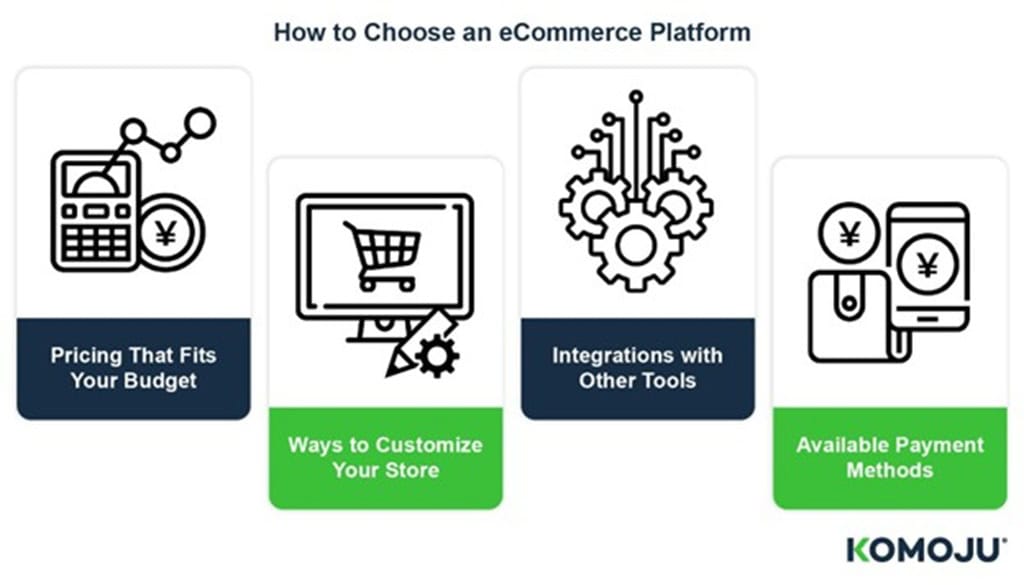
How to Choose an eCommerce Platform
The right platform should match your business goals—not just now, but as you grow. Here are four areas that directly affect operations, costs, and customer experience.
Pricing That Fits Your Budget
Shopify keeps pricing straightforward. Hosting, security, and software updates are all bundled into a monthly plan, and most tools are available through its app store. The costs are clear, but they can add up—especially if you need multiple paid apps or use an external payment provider that charges extra transaction fees.
WooCommerce, by contrast, is free to use, but not free to run.
You’ll need separate hosting, a domain, and plugins to match the features Shopify includes out of the box. That means more decisions and more moving parts, but also more control over what you’re paying for.
If you want predictability and fewer setup steps, Shopify makes budgeting easier. If you’d rather choose where your money goes (server, tools, design), WooCommerce gives you that flexibility.
Ways to Customize Your Store
WooCommerce is known for customization. If your store needs very specific features, you can build them. This includes custom product flows, local checkout, or niche designs. There’s a plugin for almost everything, and no restrictions on how you implement them.
Shopify keeps things simpler. Themes are clean and modern, and its drag-and-drop editor covers most merchants’ needs. Custom work is possible, but it requires developer knowledge to use Shopify’s Liquid language.
If your business has unique requirements (or might in the future), WooCommerce provides you with more flexibility to evolve. If you want to launch fast with a refined design, Shopify gets you there quicker.
Integrations with Other Tools
Most modern stores rely on third-party tools for marketing, inventory, shipping, and analytics. Both platforms support them, but how they connect is different.
Shopify’s app store is built for non-technical users. Install, connect, and you’re usually ready to go.
WooCommerce supports a broader range of integrations through WordPress plugins or APIs. It’s more flexible, but may require setup or troubleshooting to get things working smoothly.
If you need speed and stability, Shopify’s ecosystem works well out of the box. If you require specific workflows or software, WooCommerce may offer a better long-term solution.
Available Payment Methods
Payment options directly impact conversion—especially in markets where customers prefer local payment methods.
Shopify offers its own payment system (Shopify Payments) in supported countries, as well as integrations with local gateways where available. Some features may be limited depending on your market.
WooCommerce supports payment gateways, along with region-specific options via plugins or third-party services. It’s powerful for merchants targeting multiple countries with different payment needs.
Choose what supports your customers’ preferred payment methods—especially if you’re selling internationally. For merchants selling in Japan and Southeast Asia, KOMOJU Payment Methods offer support for local payments on both platforms.
Feature | Shopify | WooCommerce |
Pricing & Budgeting | Fixed monthly pricing that includes hosting, security, and updates. Costs are predictable but can increase with paid apps or extra transaction fees. | Free core software, but requires paid hosting, domain, and plugins. Costs vary based on chosen services. This offers more control but may be less predictable. |
Ease of Setup | Quick to launch with minimal setup. Most features work out of the box. | Requires more setup and decisions (hosting, plugins, configuration). |
Customization | Clean, modern themes with a drag-and-drop editor. Advanced customization requires developer knowledge and Shopify’s Liquid language. | Highly customizable with full control over design, features, and checkout. Supports custom product flows and niche requirements without platform restrictions. |
Flexibility & Scalability | Best for businesses that want simplicity and fast set up. | Ideal for businesses with unique or changing requirements that need long-term flexibility. |
Integrations & Apps | App store designed for non-technical users. Install and connect quickly with minimal configuration. | Extensive integrations via WordPress plugins and APIs. More flexible but may require technical setup or troubleshooting. |
Stability & Maintenance | Hosting, updates, and security handled by Shopify. | The business owner is responsible for hosting, updates, and maintenance. |
Payment Methods | Shopify Payments in supported countries, plus local gateways. Availability and features depend on the region. | Supports a wide range of global and region-specific gateways through plugins and third-party services. |
International Selling | Strong support, but some payment features vary by market. | Highly adaptable for multi-country selling with different local payment needs. |
Local Payments (Japan & SEA) | Supports local payment methods via providers like KOMOJU. | Also supports local payment methods via KOMOJU and other plugins. |
Summary:
- Choose Shopify if you need simplicity, predictable costs, and fast setup.
- Choose WooCommerce if you want maximum control, customization, and flexibility—especially for complex or region-specific requirements.
Cost Comparison: WooCommerce vs Shopify
Choosing between Shopify and WooCommerce often comes down to cost structure—fixed vs. flexible. Shopify offers clear pricing with bundled features, while WooCommerce gives you control over each expense.
Note: Plan pricing and names vary by country. For example, Shopify’s mid-tier plan is labeled “Shopify” in some markets, but may appear as “Grow” in others (including Japan). Pricing shown in local currency.
Shopify: Best for Small to Mid-Size Merchants Who Want to Launch Fast
Shopify offers fixed monthly and annual plans that include hosting, security, and maintenance. As of December 2025:
Plan | Monthly billing | Annual billing (approx. monthly) | Notes |
Basic | $39/month | ~$29/month | Billed annually for a discounted rate |
Shopify (mid-tier plan) | $105/month | ~$79/month | The plan name is “Shopify” in some regions |
Advanced | $399/month | ~$299/month | Billed annually for a discounted rate |
Plus (Enterprise) | From ~$2,300/month | Contract-based | Typically a 1–3 year term |
Bundled Features
Each plan scales up with extras like reports, staff accounts, and shipping discounts. Shopify Payments comes bundled and avoids extra transaction fees.
Third-Party Gateways
Using an external provider (such as KOMOJU) adds 0.5% to 2.0% in Shopify fees (in addition to gateway processing). This fee varies by plan.
Why Use a Payment Gateway?
Many merchants still prefer them for access to local payment types, broader currency support, or features Shopify Payments lacks. KOMOJU, for instance, supports Japanese methods like PayPay and konbini (convenience store) payments—options that can reduce cart abandonment in local markets.
Real Costs Over Time
While plan pricing is upfront, expenses stack fast. Most stores add paid apps for things like email, reviews, or inventory sync. Premium themes and multi-language tools also often come with a price tag.
Simplicity vs. Flexibility:
Shopify offers speed, structure, and reliability. But it limits customization, and costs can grow quickly as your store expands.
WooCommerce: Best for Established, Cost-Conscious, High-Volume Sellers with Technical Resources
WooCommerce is free software, but running a store involves separate costs for:
Feature | Typical Cost | Notes |
Hosting | $10–$30/month | Basic managed WordPress hosting; higher tiers available for scaling |
Domain & SSL | ~$10–$50/year | Often bundled with hosting plans, SSL certificates may be free (e.g., Let’s Encrypt) |
Themes & Plugins | $50–$200/year (each) | Many are free; premium extensions are required for subscriptions, multilingual support, shipping, etc. |
Developer Support | Varies (optional) | Useful for customization, debugging, or performance tuning |
WooCommerce itself is free, but actually running a store involves several separate costs. You’ll need hosting, a domain, and add-ons to replicate the features other platforms bundle in. That gives you greater control but also more decisions to make, and more responsibility.
It starts with hosting. Managed WordPress plans with decent performance are widely available, and many include SSL certificates and domain registration. However, not all providers offer the same extras—so it’s worth checking what’s actually provided before committing.
Once your hosting is sorted, the next consideration is plugins and themes. WooCommerce offers a robust library of free extensions. However, core features such as subscriptions, multilingual support, and advanced shipping often require paid extensions, which typically charge either annual or monthly fees.
Many stores also opt for a premium theme to improve speed, design, or mobile experience. This can incur either an upfront or recurring cost.
One clear advantage is that WooCommerce doesn’t charge platform fees for using third-party gateways. Unlike hosted platforms, there’s no added transaction markup.
Ultimately, all that flexibility means more setup and maintenance. You’ll manage updates, security, and backups—or bring in someone who can handle these tasks. But in return, you keep full control over your stack and where you invest.
Feature Comparison: WooCommerce vs Shopify

Both WooCommerce and Shopify offer strong foundations for running an online store, but they take different approaches.
- Shopify is an all-in-one solution focused on simplicity and support
- WooCommerce offers more control and flexibility—at the cost of requiring more hands-on setup.
Setup and Maintenance
Getting started with Shopify is straightforward. Hosting, updates, and security are all handled for you, which means fewer decisions and less time spent on technical details. It’s ideal if you want a fast, low-stress launch.
WooCommerce gives you more control, but you’re responsible for everything from hosting to plugin updates. That flexibility appeals to sellers who want a tailored setup—but it requires more involvement.
Site Building Features
Shopify offers a unified experience with built-in themes and a simple visual editor. You can create a functional and visually appealing storefront without writing a single line of code. With WooCommerce, site design is powered by WordPress themes and builders. You have more freedom to customize layouts and functionality, especially if you (or your developer) are familiar with WordPress.
Customer Acquisition Tools
Shopify includes marketing basics like SEO optimization, email capture, and native integrations with ad platforms. These tools are ready from day one.
WooCommerce gives you access to a vast ecosystem of marketing plugins, many of which go deeper or offer unique features. You’ll have to choose and configure them yourself, but they can be more powerful or more localized depending on your needs.
Sales Promotion
Discounts, coupon codes, and product bundles are available on both platforms. Shopify makes them easy to apply out of the box. In WooCommerce, you can get the same capabilities—and more complex rules—with plugins. It requires more setup, but provides greater control over how promotions work.
Security
Shopify handles all site security by default, including SSL (Secure Sockets Layer) certificates and payment compliance. It’s built into the platform. WooCommerce depends on your hosting environment and security practices. You can make it just as secure—but you or your host needs to manage things like backups, firewall rules, and updates.
Support
Shopify users receive direct 24/7 support via chat and email, along with extensive help documents and community forums.
With WooCommerce, support depends on the services you use. Your host, plugin developers, and WordPress community all play a role. It’s less centralized, but you often get support from the source of each tool.
Payment Options
Both platforms work with major payment gateways, and Shopify includes its own processor with reduced transaction fees. Using a third-party gateway like KOMOJU adds a platform fee unless you’re on a higher-tier plan.
WooCommerce supports nearly any gateway without platform fees. That makes it easier to offer region-specific methods or integrate with local providers—especially important for international sellers.
Offering local payment methods that Japanese shoppers prefer can significantly reduce cart abandonment. Many Japanese users will leave the store if their preferred payment option isn’t available.
Features | Shopify | WooCommerce |
Setup & Maintenance | Very easy; hosting, updates, security included | More control; you manage hosting, updates, plugins |
Site Building | Built-in themes and visual editor, no coding needed | WordPress themes/builders, highly customizable |
Marketing Tools | SEO, email capture, ads integrations included | Large plugin ecosystem, more setup required |
Sales Promotions | Discounts and coupons built-in and easy to use | Advanced rules possible via plugins |
Security | Fully managed (SSL, compliance included) | Depends on hosting and your setup |
Support | 24/7 centralized support | Decentralized (host, plugins, community) |
Payment Options | Built-in payments; extra fees for some gateways | No platform fees; supports many local gateways |
Is Migration Between Shopify and WooCommerce Possible?
Yes—whether you’re moving from Shopify to WooCommerce or vice versa, migration is entirely possible and supported by both platforms.
Switching from Shopify to WooCommerce
WooCommerce provides a step-by-step migration guide that walks you through how to export your data and bring it into WordPress.
There are also third-party plugins and services available to help automate this process, minimizing downtime and complexity. Since WooCommerce is open-source, it’s especially appealing to merchants looking for more flexibility or lower long-term platform fees.
Switching from WooCommerce to Shopify
Shopify also offers a dedicated migration from WooCommerce guide, helping merchants import products, customers, and order data from WooCommerce. The platform is easy to use, so those who prefer a more structured environment find the transition worthwhile.
KOMOJU Supports Both Platforms
KOMOJU actively supports merchants usingShopify, WooCommerce, and other popular e-commerce platforms
For example, CAGUUU, a Japanese furniture brand, migrated from Shopify to SHOPLINE (Japanese) without needing to overhaul their payment setup.
Because KOMOJU supports both platforms, they were able to keep payments running without interruption and focus on rebuilding their storefront instead of troubleshooting payment issues.
You can move between Shopify and WooCommerce, and both platforms provide guides and tools to make the transition straightforward. Services like KOMOJU help ensure payments continue running smoothly during the switch.
Which Platform Is Right for You?
Choosing between WooCommerce and Shopify often comes down to how much control you want—and how much setup you’re willing to take on.
Best for WooCommerce Users
WooCommerce appeals to merchants who like flexibility. It’s a strong fit if you already use WordPress or want to tailor every aspect of your store—from product layout to backend logic. You have control over hosting, design, and functionality, with the freedom to add features as your business grows.
It’s ideal for stores with unique needs, like subscription models, advanced shipping rules, or multilingual support. Having developer access means you can customize as you wish—or build something that’s impossible on closed platforms.
KOMOJU integrates directly with WooCommerce, making it easy to offer region-specific payment options, such as digital wallets and bank transfers, among others.
Best for Shopify Users
Shopify is designed for merchants who want to start selling fast. The interface is intuitive, the setup is guided, and most core features—hosting, security, updates—are taken care of behind the scenes. You can focus on your products, not your tech stack.
It works especially well for sellers who value stability, prefer not to manage plugins, and are comfortable working within Shopify’s framework. With thousands of apps, integrations, and themes, it still allows for flexibility—just with far less setup.
With KOMOJU on Shopify, it’s easy to offer local payment options—so your store feels native, no matter where your customer shops from.
Summary | Know What You Need and Choose Shopify or WooCommerce
Both Shopify and WooCommerce are capable platforms—but they serve different priorities.
Main differences between Shopify and WooCommerce
- Shopify is a fully managed platform focused on speed, simplicity, and built-in support. It’s ideal for businesses that want to avoid technical maintenance.
- WooCommerce is a self-hosted solution that offers greater flexibility and ownership, but requires more technical knowledge or developer support.
The right platform depends on how you sell, where your customers are, and what kind of complexity your team is ready to manage. Match the strengths of the platform to the demands of your business—and not the other way around.
FAQ
- WooCommerce offers the flexibility to build exactly what you need. It is better for customization because it gives full control over design, features, and payment handling.
- Shopify offers customization mainly through apps and themes, but within a more controlled environment.
- Both Shopify and WooCommerce support local Japanese payment methods through integrations like KOMOJU, making either platform suitable for entering the Japanese market.
We help businesses accept payments online.