POS Systems: How They Work, Costs, and Differences from Payment Terminals
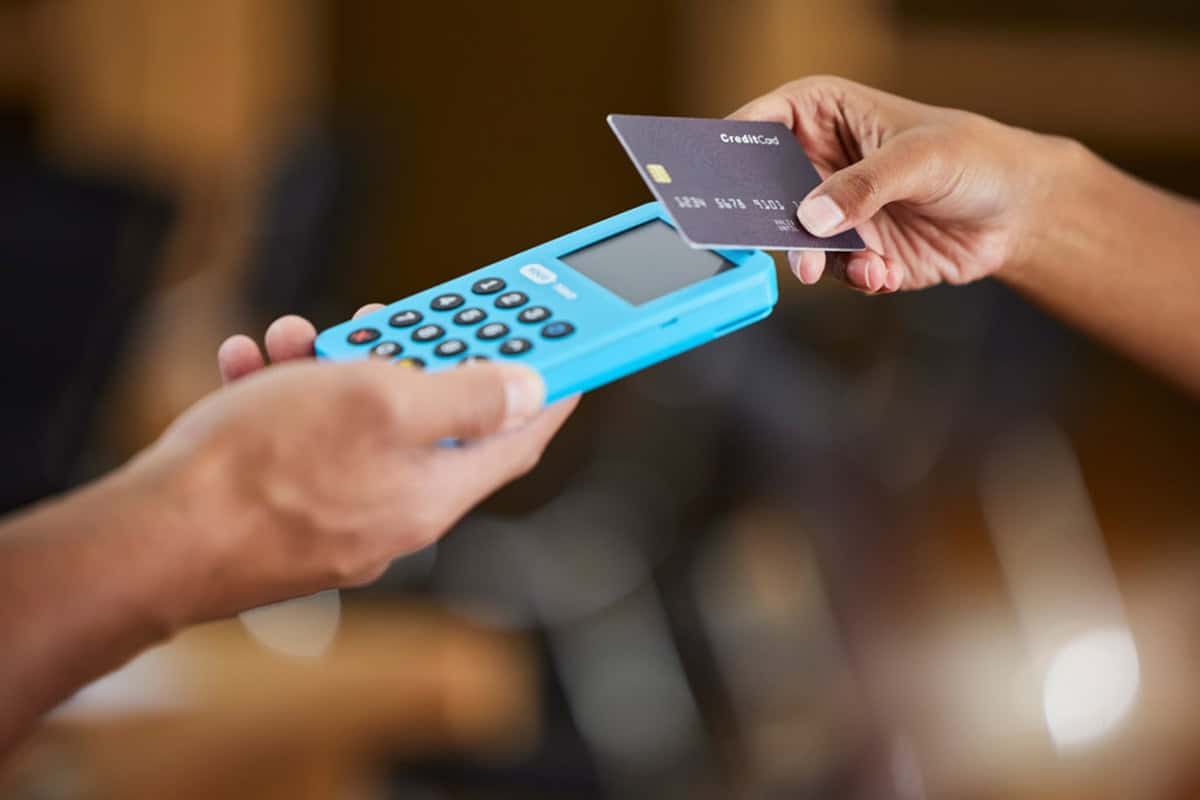
Table of Contents

We help businesses accept payments online.
On a busy day, small problems at checkout add up fast. Prices that don’t match the shelf, items showing “in stock” that you already sold, or credit cards failing for no clear reason. Each one can slow the line, frustrate customers, and make closing out the day harder than it needs to be.
A POS system prevents those problems. It links every sale to payment—updating inventory, applying tax, and recording each transaction in one system, whether the sale happens online or in person.
On the other hand, some businesses must stay mobile and light. A simple payment terminal lets customers tap, insert or swipe their credit card, or scan a QR code to pay. It’s ideal when you only need to accept payments, not manage a store.
This article explains how POS systems work and what they cost—and shows you whether your business is better served by a full POS setup or a payment terminal.
What Is a Point of Sale (POS) System?
A POS system is the hardware and software a business uses to take payments and track sales. It records what was sold, how much was paid, and how the customer paid—while automatically updating inventory and generating receipts.
As explained by Mastercard, early POS systems were little more than cash registers. Today, they’re central business tools that connect checkout with your inventory, reporting, customer data, and more. They do more than process payments—they help manage stock, track sales trends, and unify your online and in-person operations.
Modern POS platforms operate on smartphones, tablets, and dedicated terminals. Many are cloud-based, meaning your sales and inventory data stay in sync across devices and locations—and you can manage your business from anywhere.
Some systems also support local payment methods or customer languages, making them especially useful for businesses serving regional or international audiences.
How Do POS Systems Work?
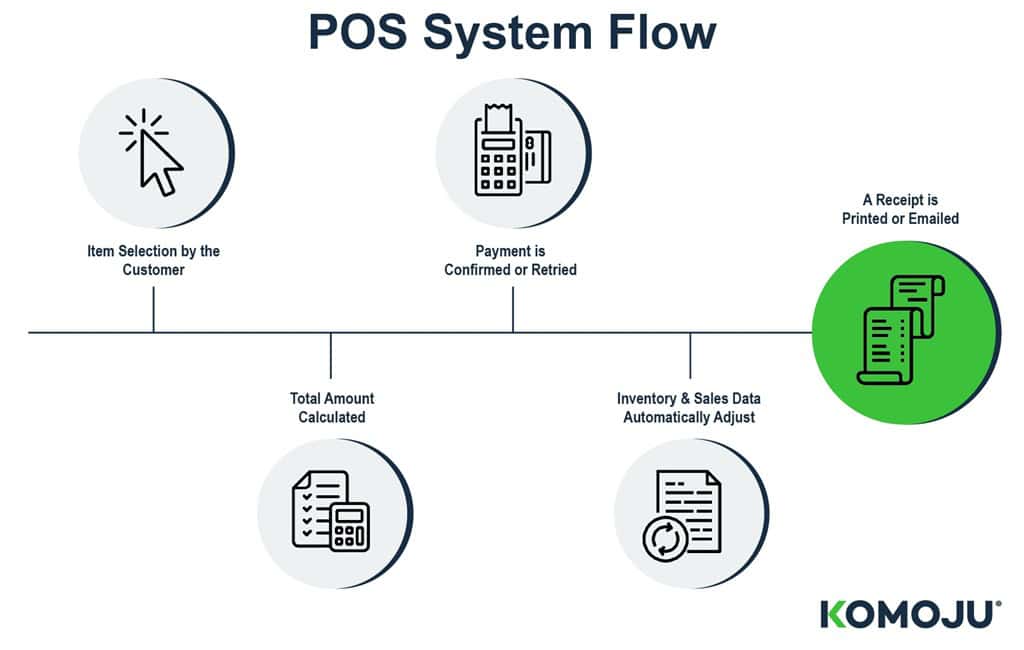
Every sale follows a simple flow—whether it happens at a register, on a tablet, or through a mobile reader. The POS system handles each step automatically, connecting payments, inventory, and records behind the scenes.
Here’s how it typically works:
1. The Customer Selects Items
The process begins when a customer chooses what to buy—by bringing an item to the counter, tapping a service on a screen, or ordering from a mobile menu. Whether you’re running a food truck, boutique, or a large business or pop-up vendor, this step marks the beginning of the sale.
2. The System Calculates the Total
The POS applies pricing, tax, discounts, and any extras—like tips, modifiers, or service fees. For example, a retail store might apply a promo code, a salon might offer a treatment upgrade, or a cafe might split the bill. The system totals everything, so checkout runs smoothly.
3. Payment Is Made and Confirmed
The customer pays using their preferred method, such as a credit card, digital wallet, or QR code. Some systems also support local payment options, which can be essential for regional businesses. Once payment is approved, the sale is confirmed.
4. Inventory and Records Update
After the sale, the system updates your inventory and logs the transaction. For a food truck, this might deduct a sandwich from stock. For a pop-up, it might sync with your online store.
If you sell digital goods (e-books, game downloads, PDF files, etc.), the system can automatically deliver access and record the purchase. If accounting or analytics tools are linked to your POS system, they also get updated.
5. A Receipt Is Sent or Printed
The system provides a receipt, which can be printed, emailed, or texted. That finishes the sale for the customer, and behind the scenes, the POS system updates your sales history, tax totals, and daily reports automatically.
Key POS System Features
Modern POS systems do more than accept payments. They help streamline daily operations, reduce manual work, and give you visibility into what’s happening across your business.
Inventory Management
A POS system tracks what you sell and automatically adjusts your inventory. It helps prevent overselling, highlights low-stock items, and makes restocking easier. If you sell both online and in person, a cloud-based POS system can keep your inventory in sync across all channels.
Payment Processing
POS systems support most payment methods, including credit cards, mobile wallets, QR codes, and region-specific options. The payment process is fast, secure, and integrated into your daily reporting, so there’s no need to reconcile systems manually.
Sales Tracking and Analytics
Every sale feeds into a single system, providing you with real-time insights into what’s selling, when, and where. Whether it’s a weekday lunch rush or a weekend pop-up, you can track performance by time, product, or location.
For omnichannel business owners, such as those selling both online and in-person, a POS system consolidates all your data in one place. For example, if a customer places an order online and returns it to your pop-up shop, the system automatically updates your inventory, sales records, and customer profile.
Staff Scheduling and Time Tracking
Many POS systems allow team members to clock in and out, track hours, and assign permissions. This helps manage shifts, calculate labor costs, and restrict access to sensitive settings and refund processing.
Types and Costs of POS Systems
POS systems come in several forms, and the right one depends on how your business operates on a day-to-day basis. A food truck or weekend pop-up may only need a lightweight tablet setup. A busy cafe or salon with multiple staff members often prefers a fixed terminal. Larger stores—or businesses that require detailed reporting or multiple checkout points, such as hotels—may need PC-based systems or kiosks.
Below is an overview of the most common POS system types, along with the typical cost ranges associated with each.
POS System Type | What It Is | Pros | Cons | Initial Hardware Cost | Yearly Software / Service Cost |
Tablet-based POS System | Tablet or smartphone running POS software with a card reader | Low setup cost, portable, easy to start using, and cloud-based updates | Less durable, relies on Wi-Fi, limited accessory support | Low | Low to Medium (subscription and transaction fees) |
Terminal-based POS System | Fixed all-in-one register with touchscreen and built-in payment hardware | Durable, fast checkout, supports peripherals, consistent performance | Higher upfront cost, not portable | Medium | Medium (subscription or bundled service plans) |
PC-based POS System | POS software installed on Windows/macOS with peripherals (scanner, printer, drawer) | Flexible setup, can reuse existing hardware, customizable | Requires maintenance, updates, and security management | Low to Medium | Low to Medium (license, maintenance, or subscription) |
Self-service Kiosk | Standalone touchscreen station for customer-led browsing and checkout | Reduces staff workload, shortens lines, and ensures consistent order flow | High hardware cost, some users prefer staff interaction | High | Medium to High (subscription and support) |
Tablet‐Based POS System
A tablet-based POS system uses a tablet or smartphone paired with a card reader. It’s lightweight, simple to set up, and easy to move around. Most software is subscription-based and cloud-hosted, handling updates, backups, and reports online.
Tablet-based POS systems typically have low initial hardware cost and low to medium yearly subscription and transaction fees.
Terminal-Based POS System
A terminal-based POS system is a fixed, all-in-one device that includes a touchscreen, card reader, and receipt printer. It’s built for steady, daily use and supports accessories like scanners or cash drawers. Usually, software is subscription-based or bundled with a service plan that includes the hardware.
Terminal-based POS systems usually have a medium initial hardware cost and medium yearly subscription or service fees.
PC-Based POS System
A PC-based POS system runs POS software on a Windows or macOS computer with peripherals such as scanners or receipt printers. It offers flexibility, allowing businesses to reuse existing hardware. Software is purchased as a one-time license or as a recurring subscription, depending on the provider.
PC-based POS systems generally have low to medium initial hardware cost and low to medium yearly licensing or maintenance fees.
Self-Service Kiosk
A self-service kiosk is a standalone touchscreen station equipped with built-in payment hardware, enabling customers to order or check out independently. Software is almost always subscription-based due to the need for frequent updates, analytics, and security requirements.
Self-service kiosk systems tend to have high initial hardware costs and medium to high yearly subscription and support fees.
Things to Consider Before Implementing a POS System
Choosing a POS system begins with understanding how your business operates on a daily basis—your checkout flow, workload, and the tools your staff actually use. There isn’t a single “best” option, but there is a system that fits your pace, transaction volume, and operational needs.
This section outlines the key points to consider before implementing a POS system. This includes payment methods, integrations, and long-term scalability.
Here are the key points to consider before making a decision.
Does It Fit Your Business Type?
Different POS systems are designed for different environments. Tablet-based systems offer mobility and low setup costs. Fixed terminals provide durability and faster checkout. PC-based systems offer flexibility for more control over your hardware.
Beyond daily operations, consider how the system will handle your workload as you grow. If you expect to add more staff, expand to multiple locations, or sell across several channels, choose a POS system that can scale with you.
It’s also worth checking whether the system can still process payments if your internet connection goes down, or whether it requires a constant connection.
Does It Solve Your Business Challenges and Provide Cost-Effectiveness?
A POS system should earn its keep by reducing wasted time and giving you reliable numbers to work with. Look for features that address problems you actually have—such as accurate inventory tracking, faster checkout, clearer reporting, or easier staff management.
Cost-effectiveness isn’t only about the subscription fee. Add up hardware, software, maintenance, payment processing, and any extra modules you may need later (for example, advanced inventory, loyalty programs, or booking tools). Security is also important, so confirm that the system supports EMV chip cards, NFC/contactless payments, and PCI DSS–compliant hardware.
In short, a strong POS system should save time, reduce errors, and keep your overall operating costs under control.
Does It Support the Payment Methods You Need?
Customers tend to favor payment methods they already use, and this varies by region. A POS system that supports locally rooted payment methods makes checkout easier and reduces the number of abandoned carts.
In many regions, locally rooted payment methods dominate daily transactions. For example, Brazil’s Pix accounts for around 40% of e-commerce volume, and India’s UPI contributes 55%, according to data from PCMI.
If You Only Need Payments, Consider a Payment Terminal

If your workflow is simple and you just need to take payments quickly and reliably, a payment terminal is often the more practical choice.
A payment terminal is a standalone, handheld device that accepts cards, contactless/NFC payments, QR codes, and digital wallets. Setup is usually minimal—power it on, connect it to Wi-Fi or mobile data, and you’re ready to start taking payments.
However, some providers still require initial configuration, contracts, or activation fees, and a terminal won’t replace a full POS system if you need inventory tracking or detailed item-level reports.
Payment terminals focus on three essentials:
1. Payment Processing
The terminal handles chip, swipe, and contactless payments, sends the authorization request, and confirms approval within seconds. Because there’s no catalog to load or checkout screen to customize, transactions are extremely fast.
2. Basic Sales Tracking
Many modern terminals include lightweight reporting dashboards. You can check total revenue for the day, see which payment methods customers used, or download simple settlement reports. While it isn’t as detailed as a POS system, it’s enough for merchants who don’t need full analytics.
3. Data Collection and Analysis
Even without a full POS system, terminals still gather valuable data such as volume by time of day, repeat transaction frequency, and payment type trends. This helps small merchants monitor their performance without needing to learn complex software.
Because payment terminals don’t manage inventory or staff, installation is minimal and costs are lower. There are fewer screens to configure, no catalog to upload, and no need to train staff on complex workflows.
KOMOJU Terminal is a payment terminal specifically designed to simplify and streamline online payments for businesses. It lets you accept credit card and QR code payments and manage from one simple dashboard, including real-time sales tracking, payout management, and refunds.
Learn more about KOMOJU Terminal
Benefits of Payment Terminals
For small or mobile businesses, fast payment processing and efficient service often outweigh advanced POS features. Modern payment terminals manage essential tasks such as processing payments, tracking sales, and syncing data, while remaining portable and user-friendly. Below are the advantages you can expect from using a payment terminal.
Unified Management of Online and In-Store Data
When you use the same provider for online and in-person payments, payment terminals can sync those transactions into a single dashboard. This provides a single view of revenue, refunds, and payout history. Even without a complete POS system, you can track all payments from one screen.
Use Data to Improve Marketing
Each transaction provides insight into customer purchasing habits. Over time, you can identify busy hours, popular items, repeat customers, and seasonal trends. Even basic payment terminals offer enough data to help you schedule promotions, manage inventory, and effectively allocate your marketing budget.
Smooth Payment Processing
Payment terminals process tap, chip, PIN, and QR payments directly for fast and consistent checkouts. This reduces friction during busy periods, shortens lines, and improves customer satisfaction and repeat business.
Reduction of Human Error
Payment terminals automate payments, eliminating the need for manual entry. This reduces errors such as mismatched amounts, incorrect change, or customer disputes.
Support for Multiple Payment Methods
Accepting multiple payment methods broadens your customer base. Many customers expect to use cards, mobile wallets, or local options and may avoid stores that do not support them. Payment terminals meet these expectations, helping you capture sales that cash-only businesses might otherwise lose and making your shop more attractive to customers who prefer cards or digital payments.
Industries Well-Suited for Payment Terminals
Payment terminals are a good fit for many types of businesses. They help with in-person checkout and are even more useful if your business also has an online store, booking system, or delivery service with the same payment provider. This way, you can manage both online and in-store payment data in one place.
Payment terminals also work well for businesses that use several sales channels, like combining an online shop, bookings, or invoices with in-person checkout. They make it easy to keep all your payment data together.
Here are just a few examples of the wide range of industries that may benefit.
Restaurants, Cafes, and Food Trucks
Payment terminals let you take payments at the counter or at tables, and the same provider can handle online orders or delivery payments. This helps you track total revenue, refunds, and payouts for both in-person and online sales.
Retail Stores
Terminals at the counter process in-store card and wallet payments, and your e-commerce site uses the same payment provider. Online and in-store payment data can then be managed in one system, so you do not have to reconcile separate reports.
Hotels and Resorts
Front desk, restaurants, and other on-site facilities can use payment terminals. If room bookings and online prepayments run through the same payment platform, guest payments, refunds, and settlement data stay consistent across channels.
Beauty Salons and Similar Services
Terminals make it easy to accept in-person payments for services, packages, or memberships. If your salon also sells products or gift cards online, using the same payment provider allows you to manage those e-commerce sales alongside in-store payments in a unified system.
Summary | Deciding What’s Best for Your Business: POS or Payment Terminal
Picture the end of a busy day. If you’re counting stock by hand, chasing mismatched totals, and guessing which items sold where, a POS system is a more suitable option. It gives you item-level tracking, real-time inventory updates, and consistent reporting across all channels.
A POS system helps you track sales, manage stock and staff, and combine online and in-person transactions in one place. It brings together prices, tax, inventory, and payments so you can see how your business is performing.
If you just need to accept payments quickly and reliably, a payment terminal would be a good option. It’s simple to set up and supports cards, contactless payments, QR codes, and local methods. By using KOMOJU Terminal, you can start accepting in person payments, receive payout the next business day and manage payments easily.
See how KOMOJU Terminal fits your business
Match your choice to your daily workflow, the level of detail you need in your data, and how your customers prefer to pay. The right setup, whether a full POS system or a simple payment terminal, should make the numbers clearer and the workday easier.
We help businesses accept payments online.